Passwords have protected online accounts since the 1960s, but their fundamental design flaw has never changed: they are secrets that can be stolen, guessed, or leaked. In 2024 alone, credential-based attacks remained the leading vector in data breaches tracked by major incident response firms, and reused or weak passwords continue to expose millions of US and Canadian consumers each year. The shift toward passkeys vs passwords is not a gradual trend. It is an accelerating replacement cycle backed by Apple (AAPL), Google (GOOGL), and Microsoft (MSFT), all three of which now support passkeys natively across their operating systems and browsers. For a broader look at how this fits into the evolving security landscape, explore WideJournal’s tech articles.
Passkeys use public-key cryptography to replace the shared-secret model entirely. When you log in with a passkey, nothing sensitive ever travels over the network. There is no password to intercept, no database of credentials to breach, and no phishing page that can capture what you type. That is a structural improvement, not just a usability convenience. The FIDO Alliance, the standards body behind passkeys, reported that passkeys are now available on more than 8 billion accounts across major platforms as of 2024, a figure cited directly by the National Institute of Standards and Technology.
This article explains exactly how passkeys work at the protocol level, compares them honestly against passwords and legacy multi-factor authentication (MFA), addresses legitimate security concerns, and walks through how to set up a passkey on the platforms you already use. If you have been wondering whether to make the switch or whether passkeys are actually as safe as claimed, the answer involves both strong evidence and a few important caveats.
Key Takeaways
- Passkeys use asymmetric cryptography (public/private key pairs) so your private credential never leaves your device and cannot be phished or leaked in a server breach.
- NIST’s SP 800-63B supplement formally recognizes syncable authenticators (passkeys) as meeting Authentication Assurance Level 2 (AAL2), the same level required for most federal and financial systems.
- The USDA deployed FIDO-based passwordless authentication to approximately 40,000 users, demonstrating passkeys work at enterprise scale in a US government environment.
- Passkeys are now natively supported on iOS 16+, Android 9+, Windows 11 (22H2+), and all major browsers including Chrome 108+, Safari 16+, and Edge 108+, meaning most users already have compatible hardware.
- The primary limitation of passkeys today is inconsistent cross-platform recovery: losing access to your primary device or cloud account without a backup passkey can lock you out permanently.
What Is a Passkey and How Does It Differ from a Password?
A passkey is a cryptographic key pair stored on your device that authenticates you without transmitting any secret to the server. Unlike a password, it cannot be stolen from a database because the server only stores a public key, not a shareable secret.
A traditional password works by storing a hashed version of your secret on a server. When you log in, you send that secret (ideally over TLS), the server hashes it, and compares it to the stored value. The weakness is structural: the server holds something that represents your secret. If that server is breached, attackers can attempt offline cracking of those hashes, a process that succeeds frequently against weak or reused passwords.
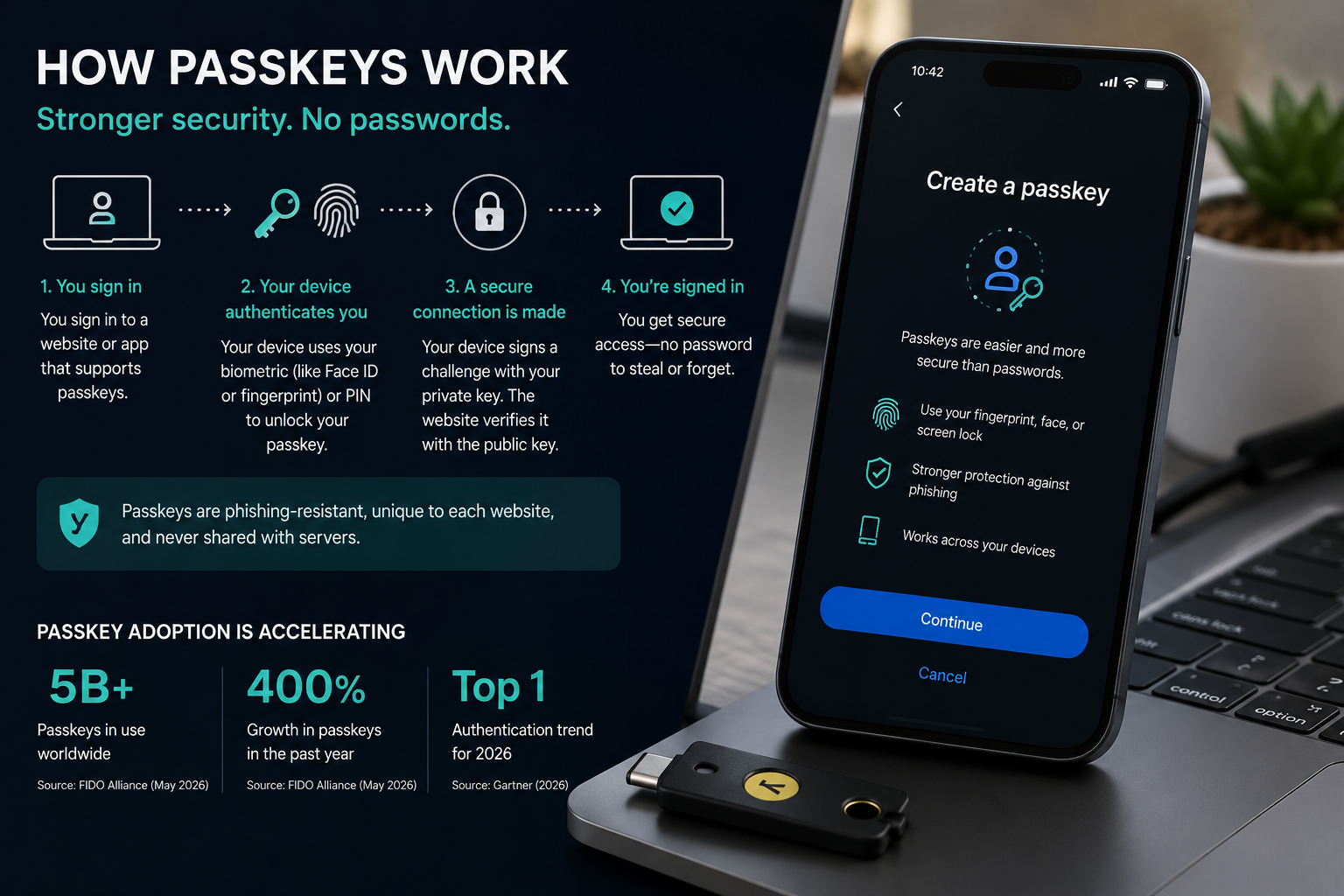
A passkey generates two mathematically linked keys: a private key that never leaves your device and a public key that the website stores. When you authenticate, your device signs a challenge from the server using the private key. The server verifies that signature using the public key it already has on file. Nothing secret is transmitted. Even if the server is compromised, the attacker only gets a public key, which is useless for logging in.
This is why passwordless authentication explained at its core is really a story about moving secrets off the network entirely. The NIST consumer cybersecurity guidance explicitly recommends passkeys as an MFA option, noting that the private digital key stored on the device enables login via PIN or facial recognition without transmitting a password.
Synced Passkeys vs. Device-Bound Passkeys
Passkeys come in two forms. Synced passkeys (also called multi-device passkeys) are backed up through a cloud keychain, such as Apple iCloud Keychain, Google Password Manager, or a third-party manager like 1Password or Dashlane. Device-bound passkeys live only on a single hardware authenticator, such as a YubiKey, and cannot be exported. Synced passkeys are more convenient and survive device loss. Device-bound passkeys offer stronger assurance for high-security use cases but require careful backup planning. A peer-reviewed ACM paper on FIDO2 passkey forensics in Windows 11 details how both flows use the WebAuthn and CTAP2 protocols and examines the forensic artifacts each leaves behind, which has direct implications for enterprise incident response.
How Do Passkeys Work at the Protocol Level?
Passkeys are built on the FIDO2 standard, combining the WebAuthn browser API and the CTAP2 device protocol to create a phishing-resistant, cryptographic login flow that works across platforms.
The how do passkeys work question has a precise technical answer. FIDO2 is the umbrella standard. WebAuthn is the browser-facing API that websites use to request authentication. CTAP2 (Client to Authenticator Protocol 2) handles communication between the browser and the authenticator, whether that authenticator is a built-in platform feature like Face ID or a hardware key.
Registration works like this: the server sends a challenge and your device generates a new key pair for that specific site. The public key and a credential ID are sent to and stored by the server. The private key is stored in your device’s secure enclave or TPM (Trusted Platform Module) and never transmitted. Authentication works by reversing that flow: the server sends a challenge, your device signs it with the private key (after you verify your identity locally via PIN, fingerprint, or face scan), and the server validates the signature against the stored public key.
The site-specific key pair design also provides built-in phishing resistance. Because the passkey is cryptographically bound to the exact origin (the domain name) where it was created, it will not authenticate on a lookalike phishing site. A password entered on a convincing fake of your bank’s login page goes straight to an attacker. A passkey simply will not work there.
Cross-Device Authentication: The QR Code Flow
Passkeys also support a hybrid flow for logging in on a new device. If you are on a Windows laptop but your passkey lives on your iPhone, the browser displays a QR code. You scan it with your phone, which uses Bluetooth proximity to confirm the devices are physically near each other (preventing remote attackers from hijacking the flow), and then authenticates locally on your phone. A 2025 IEEE empirical study on FIDO2/WebAuthn compliance tested this QR code workflow across Chrome, Safari, Edge, and Firefox with iCloud Keychain, browser profile credentials, and USB security keys, finding meaningful interoperability gaps that still need resolution across some browser and OS combinations.
Are Passkeys Safe? Risks and Limitations You Should Know
Passkeys eliminate phishing and credential-stuffing attacks structurally, but they introduce new risks around account recovery, cloud keychain security, and platform lock-in that users need to plan for.
The question “are passkeys safe” deserves a direct answer: yes, for the specific threats they target, passkeys are measurably safer than passwords. They eliminate phishing (because credentials are domain-bound), credential stuffing (because there are no reusable passwords), and server breach exposure (because only public keys are stored). NIST’s formal analysis in its SP 800-63B supplement for syncable authenticators concludes that synced passkeys can achieve AAL2 assurance, covering phishing resistance and cloning resistance, while acknowledging that sync introduces a dependency on the cloud provider’s security posture.
The risks that remain are different in nature. If an attacker gains persistent access to your unlocked device or compromises your Apple ID, Google Account, or Microsoft account, they can potentially access your synced passkeys. This is not a flaw unique to passkeys (the same is true of a password manager), but it means your cloud account becomes a high-value target. Device-bound passkeys avoid this risk but require a deliberate backup strategy. Losing a single hardware key with no backup registered means account lockout.
CISA’s case study on the USDA’s FIDO passwordless deployment across approximately 40,000 users demonstrates that at enterprise scale, passkeys successfully counter credential phishing. However, the USDA deployment used device-bound FIDO keys managed through an enterprise identity platform, a setup with IT support infrastructure that individual consumers do not have for recovery.
How to Set Up a Passkey on Major Platforms
Setting up a passkey takes under two minutes on any modern device and requires no new hardware if you use iOS 16+, Android 9+, or Windows 11.
The process for how to set up a passkey varies slightly by platform but follows the same pattern. On an iPhone or iPad running iOS 16 or later, go to a supported site’s security settings (Google, GitHub, PayPal, and hundreds of others now support passkeys), select “Add a passkey,” and confirm with Face ID or Touch ID. iCloud Keychain stores and syncs it automatically across your Apple devices. On Android 9 or later, the same flow uses Google Password Manager. On Windows 11 version 22H2 or later, Windows Hello (PIN, fingerprint, or face) handles the local authentication step.
For cross-platform users who do not want to be tied to a single ecosystem, third-party password managers including 1Password (version 8.9.13+) and Dashlane now support passkey storage, allowing a passkey created on an iPhone to be used on a Windows device through the manager’s browser extension.
Passkeys vs Passwords: Side-by-Side Comparison
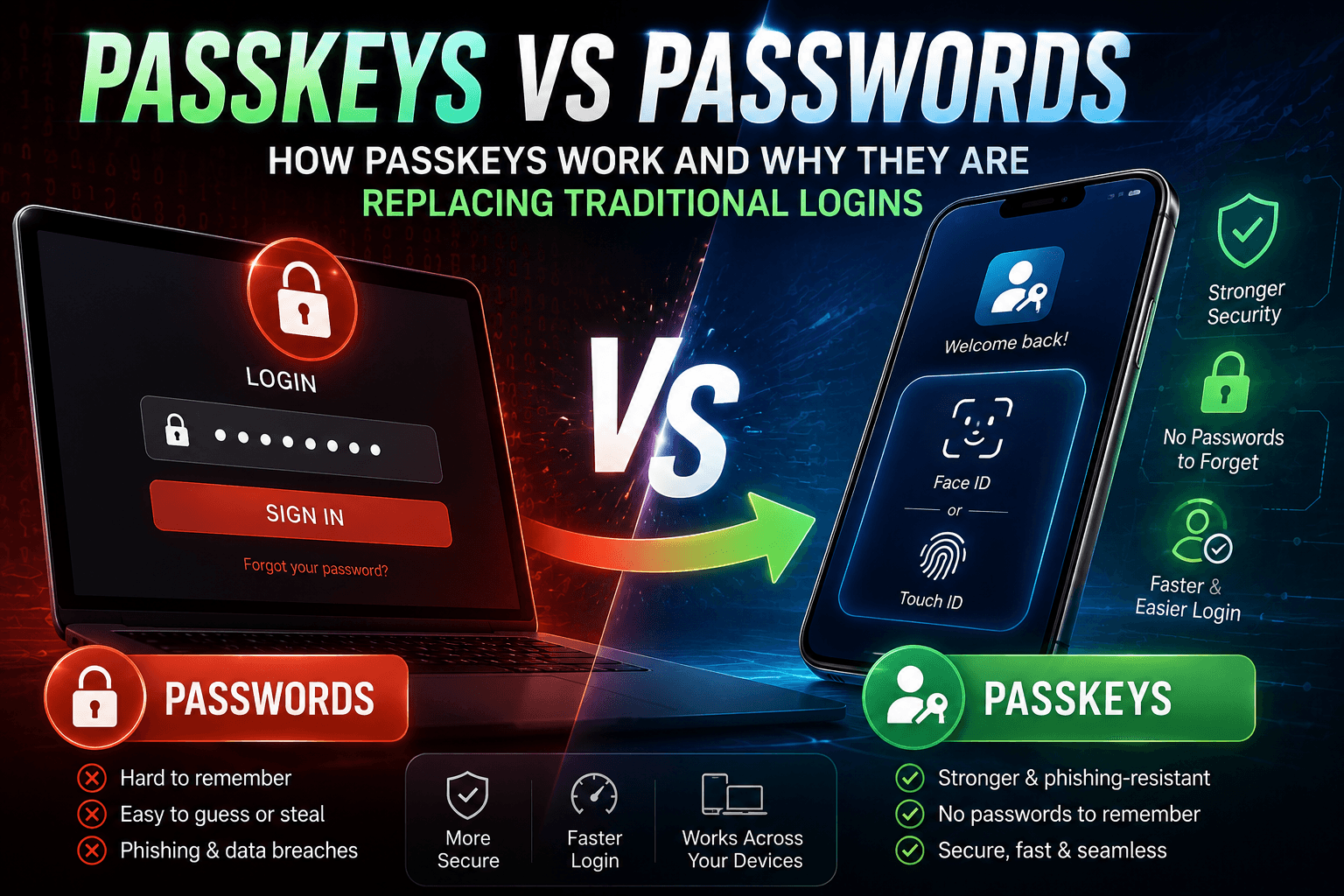
The structural differences between passkeys and passwords affect not just security but also usability, recovery, and enterprise deployment complexity.
| Feature | Passkeys | Passwords |
|---|---|---|
| Phishing resistance | Built-in (domain-bound cryptography) | None (any lookalike site can capture input) |
| Server breach exposure | Minimal (public key only stored server-side) | High (hashed passwords are crackable offline) |
| Credential stuffing risk | None (no reusable secret) | High when passwords are reused across sites |
| Account recovery complexity | High without backup passkey or recovery codes | Low (email reset widely supported) |
| Platform compatibility (2025) | iOS 16+, Android 9+, Windows 11 22H2+, Chrome 108+, Safari 16+, Edge 108+ | Universal across all platforms and browsers |
| NIST AAL2 compliance | Yes, with syncable authenticator supplement | Only when combined with a second factor |
| User experience | Biometric or PIN tap, no typing required | Typing required, prone to errors and reuse |

Alternative Perspectives
The case for caution on passkey adoption: Security researchers at several academic institutions have raised concerns about the concentration risk created when billions of passkeys are backed by a handful of cloud providers. If Apple’s iCloud Keychain or Google’s Password Manager suffers a systemic breach or policy change (such as a legal compelled disclosure), the blast radius is far larger than any single password database breach. Some enterprise security teams prefer device-bound hardware tokens precisely to avoid this dependency, accepting the operational overhead as worthwhile. This is a legitimate architectural tradeoff, not an argument against passkeys broadly.
Accessibility and equity concerns: Passkeys require a device capable of biometric authentication or a secure PIN flow, plus a stable internet connection for initial setup and recovery. Users with older devices, limited data plans, or accessibility needs that complicate biometric enrollment face real friction. The FIDO Alliance has published accessibility guidance, but implementation varies widely by platform. Passwords, for all their flaws, remain universally accessible in a way passkeys do not yet fully replicate.
“Syncable authenticators are intended to provide a high level of confidence that the same person who enrolled the authenticator is the one using it, while improving phishing resistance… NIST found the benefits of syncable passkeys outweigh the risks for most use cases.”
National Institute of Standards and Technology, SP 800-63B Supplement, 2024
“FIDO authentication effectively counters credential phishing threats because the cryptographic keys are bound to the specific website for which they were created. Even if a user is directed to a fraudulent site, the passkey will not authenticate.”
Cybersecurity and Infrastructure Security Agency (CISA), USDA FIDO Implementation Case Study
12-Month Outlook: What Changes for Users and Businesses?
Enterprise adoption will likely accelerate through 2026 as NIST’s AAL2 recognition removes the last compliance barrier, but full ecosystem interoperability remains an unfinished problem.
Three editorial conclusions are worth stating directly. First, the compliance path is now clear. NIST’s AAL2 recognition of synced passkeys means financial institutions, healthcare platforms, and federal contractors can deploy passkeys without losing regulatory standing. Expect major US banks and healthcare portals to add passkey support as a primary login option by mid-2026, not as an experiment but as a compliance-driven rollout.
Second, the interoperability gap is the next battleground. The IEEE study referenced above found real gaps in cross-browser and cross-platform passkey flows. Apple (AAPL), Google (GOOGL), and Microsoft (MSFT) have commercial incentives to keep users within their respective keychains. Third-party managers like 1Password and Dashlane may capture enterprise customers specifically because they offer ecosystem-neutral passkey storage. Watch for FIDO Alliance working group outputs on cross-platform credential portability in the second half of 2025 and into 2026.
Third, passwords will not disappear quickly. Legacy systems, particularly in healthcare, government contracting, and small business, carry technical debt that makes passkey integration a multi-year project. For the foreseeable future, most users will operate in a hybrid environment where passkeys protect high-value accounts and passwords persist elsewhere. A strong password manager paired with passkeys where supported remains the practical recommendation for most consumers today.
For deeper reading on securing your accounts and understanding the evolving threat landscape, browse WideJournal’s cybersecurity articles covering topics from MFA fatigue attacks to zero-trust architecture.
Disclaimer: Passkey implementation and account recovery protocols vary by platform and provider. Users are solely responsible for configuring secondary authentication methods, secure cloud sync, or hardware backups to prevent permanent account lockout. Technical specifications are accurate as of publication but are subject to change by software developers.
Frequently Asked Questions
Can a passkey be phished or stolen in a data breach?
No, for both threats. Passkeys are domain-bound, meaning the private key will not sign a challenge from any site other than the exact origin where it was created. A phishing site, even a pixel-perfect copy, gets no useful response. In a server-side breach, attackers only obtain the public key, which is mathematically useless for impersonating you. The private key never leaves your device’s secure enclave.
What happens if I lose my phone and I have passkeys on it?
If your passkeys are synced through iCloud Keychain, Google Password Manager, or a third-party manager, they restore automatically when you sign in to a new device with the same account. If you use device-bound passkeys on a hardware key and have no backup registered, you will need to use an alternate recovery method (such as a backup code or a secondary authenticator) provided by each service. The FIDO Alliance recommends registering at least two passkeys per account where services allow it.
Are passkeys supported on Windows 10 or older Android devices?
Native platform passkey support requires Windows 11 version 22H2 or later and Android 9 or later. Windows 10 does not support the Windows Hello passkey flow natively as of mid-2025. Users on older operating systems can still use passkeys through a cross-device QR code flow (scanning with a compatible phone), or by using a USB hardware security key like a YubiKey 5 series that supports FIDO2/CTAP2.
Are passkeys safer than using a password plus an authenticator app for two-factor authentication?
For phishing resistance specifically, yes. TOTP-based authenticator app codes (the six-digit codes from apps like Google Authenticator) can be captured by a real-time phishing proxy that relays your credentials and OTP code simultaneously to the real site. Passkeys are immune to this attack because the authentication is cryptographically bound to the domain. NIST’s updated guidelines classify passkeys as phishing-resistant MFA while classifying TOTP codes as not phishing-resistant, a meaningful distinction for high-risk accounts.